Spotlight by Verizon Connect
- 3.6
- Rating
- 100.00K
- Installs
- Free
- Price

 Analysis by App-foxy
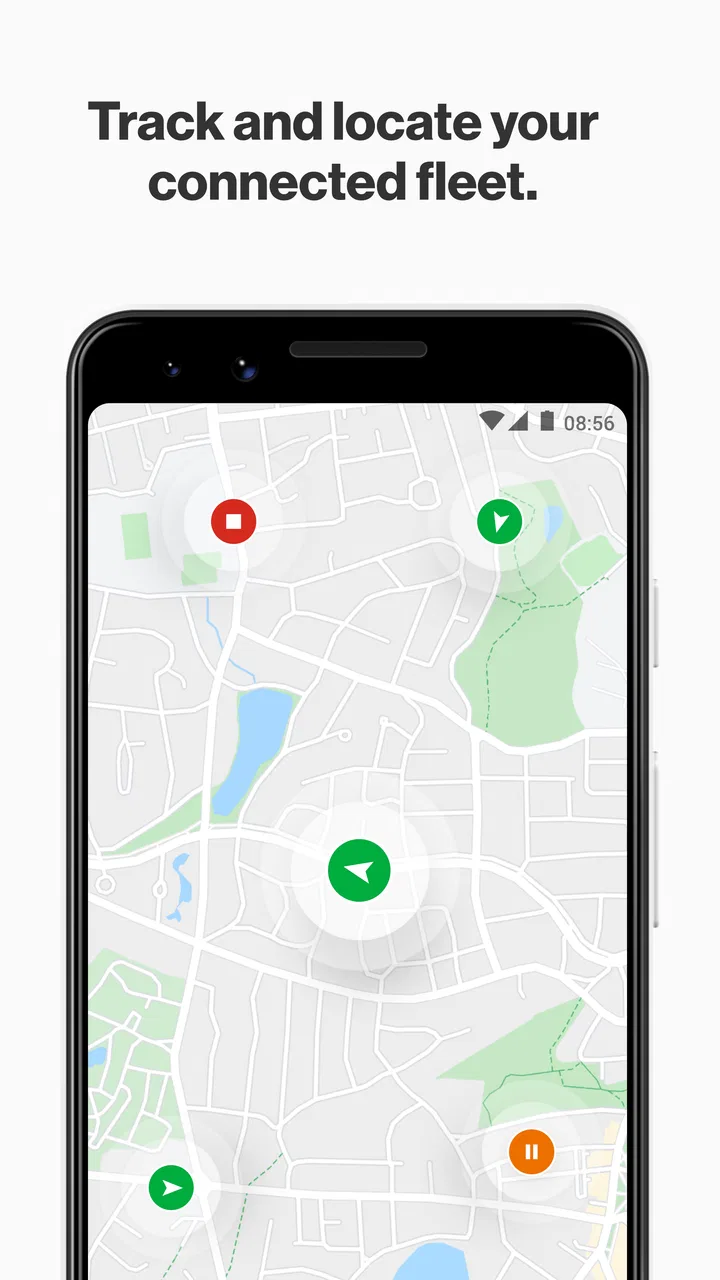
Spotlight by Verizon Connect is the kind of Maps & Navigation app that makes its value clear only when you are responsible for more than your own car. I found its purpose easy to understand: it brings vehicles, drivers, and other assets into one place so they can be managed from a phone. That makes it more relevant to a small business, a field-service coordinator, or someone overseeing a working fleet than to a casual driver looking for turn-by-turn directions.
My first impression was practical rather than exciting. This is not an app I would open for entertainment or everyday personal navigation. Its appeal comes from reducing the need to jump between scattered information when a vehicle or driver needs attention. Verizon Connect develops it as a free app for everyone, and its Android listing shows more than one hundred thousand installs, which suggests that it has found a real audience among people who need mobile access to fleet information.
The first week: useful when responsibility is spread across several vehicles
During the first few days, the main benefit is having a mobile view of the operation instead of depending entirely on a desktop routine. If I were coordinating technicians, delivery vehicles, or company assets, I would use Spotlight when away from the office: checking the current situation before calling a driver, reviewing which vehicle is associated with a task, or responding when a plan changes during the day.
You May Also Like

 Blood Strike: 2.5 Anniversary
Blood Strike’s Loadouts Turn Every Drop Into a Tactical Gamble
A close look at Blood Strike’s custom loadouts: how fast access to signature weapons reshapes its battle royale rhythm, rewards preparation, and narrows the gap between fights.

 Pandora - Music & Podcasts
Pandora’s Music Is Easy to Start, but Harder to Recover
Pandora’s strength is its low-effort path from a seed to a station. Its weak spot is how much confidence it asks you to place in connection, setup, and quiet recovery.

 8 Ball Pool
 Is Built on Rivalries, Rematches, and Routine
A close look at the rivalries, rematches, shared routines, and unanswered safety questions that turn a quick pool match into a persistent mobile community.

 Samsung Music
’s Quiet Strength Is Playing What You Already Own
Its reach comes less from spectacle than from dependable access to a personal library. That simplicity is both the app’s strongest retention engine and its ceiling.

 AccuWeather: Weather Radar
AccuWeather Review: A Quick, Clear Forecast for Everyday Decisions
For everyday plans, the best forecast is the one you can understand quickly. AccuWeather makes rain timing, radar, and local conditions easy to act on, with a few trade-offs.

 Hill Climb Racing
Why Hill Climb Racing Still Turns Crashes Into One More Run
A tiny car, a bumpy hill and one more upgrade: Hill Climb Racing keeps resurfacing because its simple chaos makes every near-miss feel personal.
More From Our News Desk



That mobile angle matters because fleet work rarely stays neatly at a desk. A manager may be walking between meetings, visiting a customer, or dealing with a vehicle issue while another member of the team needs an answer. The app is most convincing in those short moments when opening a phone is faster than finding a computer and signing into a broader management system.
The store summary describes access to vehicles, drivers, and assets, and that combination is important. A vehicle-only tracker can show where hardware is, but it does not necessarily help a supervisor connect that information to the person or equipment involved. Spotlight is more useful when the question is operational rather than purely geographic: which resource is involved, what should I check next, and who needs a response?
One practical habit I would establish immediately is to use the app for exceptions, not constant watching. Checking every vehicle repeatedly can turn a helpful tool into a distraction. A better routine is to open it when a route changes, a customer asks for an update, a driver reports a problem, or an asset needs to be located. That keeps the phone view tied to decisions instead of turning it into another screen that demands attention.
I would also spend the first week learning the relationship between the three main areas: vehicles, drivers, and assets. The value is not simply in seeing separate records. It comes from understanding how your organization uses those records together. A company that treats equipment as an afterthought may not get much from the app until its internal naming and assignment habits are consistent.
What becomes valuable after the novelty fades
After the initial curiosity wears off, Spotlight has to earn its place through repeatable use. In my view, its lasting value depends on whether a team has recurring questions that can be answered from the mobile view. If the app helps a supervisor make faster decisions several times a week, it has a reason to remain installed. If it is opened only to admire a map, its usefulness will disappear quickly.
A realistic everyday scenario would be a service company with several technicians working across town. A customer calls to ask when someone will arrive, while the coordinator is away from the office. Instead of calling every technician in sequence, the coordinator can use the available fleet context to decide whom to contact first. Even when the final answer still requires a phone call, having a clearer starting point can reduce unnecessary interruptions.
Another useful situation is a change in priority. A vehicle may need to be redirected, a driver may become unavailable, or equipment may need to be found before the next appointment. In those moments, a mobile management tool is more valuable than a general consumer map because the question is about the organization’s resources, not simply the fastest public route.
There is also a less obvious benefit: shared language. When a team uses the same vehicle, driver, and asset records, conversations can become more precise. Instead of saying “the van near the north side,” a manager can refer to the relevant record and make a decision with less ambiguity. That advantage is easy to overlook because it is a workflow improvement rather than a flashy feature.
Still, I would not treat Spotlight as a complete replacement for every fleet-management activity. A phone app is excellent for quick awareness and action, but detailed planning, reporting, administration, and long reviews are often more comfortable on a larger screen. The best long-term arrangement is likely a companion workflow: use the mobile app for timely decisions and the wider Verizon Connect environment for work that needs more space and concentration.
The app’s average rating is 3.6 from around one thousand four hundred ratings, with roughly two hundred reviews. I read that as a sign of a useful but not universally effortless experience. It does not make me dismiss the app, but it does temper expectations. Fleet tools are highly dependent on how an organization configures its records and routines, so a smooth experience for one business may feel less convenient for another.
The maintenance burden is mostly operational
The biggest long-term challenge is not the act of opening Spotlight. It is keeping the information around it meaningful. Vehicle and driver management becomes frustrating when assignments are outdated, names are inconsistent, or assets are not maintained as part of a regular process. No mobile interface can fully compensate for neglected records.
I would therefore assign ownership from the beginning. Someone should be responsible for checking that vehicles are still associated with the right people, that retired or replaced assets do not create confusion, and that the team understands which information should be trusted. This is a stronger predictor of long-term value than the first impression of the interface.
There is a useful trade-off here. A business may want every detail to be visible immediately, but more records can also create more opportunities for clutter and mistakes. I would start with the vehicles and assets that affect daily decisions, then expand only when the team has a clear reason. A smaller, cleaner operational view is usually better than a crowded one that nobody trusts.
Staff habits matter as well. If drivers, dispatchers, and managers use different names for the same vehicle, a search or status check can become slower than expected. A short internal naming convention can make the app more useful without changing the software itself. This is one of the non-obvious lessons of using a fleet app: consistency outside the app often determines how efficient the app feels inside it.
Because the app is free to download, the initial barrier is low. That does not mean the surrounding workflow is cost-free in time. Training, record cleanup, and deciding who responds to alerts or questions still require attention. I would judge the investment by the number of repeated decisions it simplifies, not by the download price alone.
Where daily fatigue can appear
Spotlight can become tiring when it is expected to answer every operational question. A manager who constantly checks locations, assignments, and asset details may feel that the app creates another stream of responsibility. The solution is not necessarily to abandon it; it is to define when the information matters and when it does not.
Another source of fatigue is the gap between visibility and control. Seeing a vehicle or driver record does not automatically solve a scheduling problem, a customer complaint, or a mechanical issue. The app can support the decision, but the human workflow still has to handle the call, the rerouting, the repair, or the follow-up. Users who expect one screen to finish the entire job may find the experience disappointing.
I would also be cautious about using it as a substitute for direct communication. Location and assignment context can help decide whom to contact, but they do not explain every delay or change in circumstances. A sensible routine combines the app with a quick confirmation from the driver or coordinator when the situation is important.
Compared with ordinary navigation apps, Spotlight serves a different purpose. Consumer navigation tools are generally better when I need directions for my own trip, traffic-aware routing, or a simple destination search. Spotlight makes more sense when the subject is a group of company resources. Compared with a desktop fleet dashboard, it offers convenience and immediacy, but a phone-sized view is not automatically the best place for deep analysis or extensive planning.
That distinction answers an important question about who should skip it. If I only drive one personal vehicle, I would not install Spotlight expecting a better navigation experience. It is also a poor fit for someone who wants a general map, public transit guidance, or a travel planner. The app earns its keep when there is an organizational relationship between vehicles, drivers, and assets.
Compatibility and practical expectations
The current version is 3.1.0.1175, and the listed minimum operating-system requirement is Android 9. Before installing, I would check the device used by every person who needs access, especially in a mixed fleet where older phones may remain in circulation. A single incompatible device can undermine a mobile workflow even when the app suits the business.
Since the content rating is Everyone, age restrictions are not the concern here. The more important question is role and access: does the person using the phone actually need fleet visibility, and will that visibility help with a recurring responsibility? A free app can still be unnecessary if it is installed by people who rarely make decisions about vehicles or assets.
I would begin with a small group of real users rather than placing it on every phone immediately. Let the people who handle dispatch, customer updates, or field coordination test the daily routine. Watch for the points where they still need a desktop, a phone call, or a separate record. Those gaps reveal whether Spotlight is becoming a useful companion or merely another place to look.
One worthwhile test is to measure decisions rather than screen time. Ask whether the app helps someone identify the right vehicle, driver, or asset faster during a real interruption. If it does, the benefit is concrete. If users open it often but still cannot act without searching elsewhere, the organization may need a better process rather than more app usage.
My long-term verdict
After the novelty fades, I see Spotlight as a focused utility rather than an app that everyone should keep on a phone. Its lasting value comes from quick access to operational context: knowing which vehicles, drivers, and assets are relevant when the day changes unexpectedly. That is a meaningful role for a fleet team, but it is a narrow one.
I would recommend it to businesses already working with Verizon Connect that need a practical mobile companion for fleet oversight. It is especially appealing to coordinators and managers who spend part of the day away from a desk and still need to make informed decisions. The best results will come from teams willing to maintain clean records and agree on a simple checking routine.
I would be less enthusiastic for a business looking for a complete standalone replacement for desktop fleet management, detailed route planning, or ordinary personal navigation. The mobile format is its strength, but also its boundary. It helps with awareness and timely action; it should not be judged as though it were designed to do every administrative task.
My final recommendation is to keep it only if it becomes part of a repeatable habit: check it when an exception occurs, use the information to choose the next action, and keep the underlying records tidy. Spotlight earns lasting space when it reduces uncertainty during real fleet decisions, not when it simply adds another map to the phone. For the right Verizon Connect user, that is enough to make it worthwhile month after month.
FAQs for Spotlight by Verizon Connect
01What is Spotlight by Verizon Connect used for?
Spotlight by Verizon Connect is designed to help businesses track and manage their vehicle fleets more efficiently. It offers real-time location tracking, driver behavior monitoring, and advanced analytics to improve fleet productivity and safety. With its user-friendly interface, managers can easily access detailed reports and optimize their operations.
02How does Spotlight by Verizon Connect improve fleet safety?
Spotlight enhances fleet safety by providing insights into driver behavior, such as speeding, harsh braking, and rapid acceleration. Managers can use these insights to coach drivers and promote safer driving habits. Additionally, the app offers real-time alerts for unsafe driving practices, helping to prevent accidents and reduce risks.
03Can I access Spotlight by Verizon Connect on multiple devices?
Yes, Spotlight is accessible on multiple devices, including smartphones, tablets, and computers. The app is compatible with both Android and iOS platforms, allowing users to monitor their fleet from anywhere at any time. This flexibility ensures that managers can stay connected and make informed decisions on the go.
04Is there a learning curve for using Spotlight by Verizon Connect?
While Spotlight offers a robust suite of features, it is designed with user-friendliness in mind. The intuitive interface and comprehensive tutorials make it easy for new users to get started. However, some time may be required to explore all features and customize settings according to specific business needs.
05What kind of customer support is available for Spotlight users?
Verizon Connect provides excellent customer support for Spotlight users, including 24/7 assistance via phone, email, and chat. Users also have access to a comprehensive online help center with tutorials, FAQs, and troubleshooting guides. This ensures that any issues can be resolved quickly and efficiently, providing peace of mind for fleet managers.
Pros
- User-friendly interface enhances navigation.
- Real-time tracking improves fleet management.
- Customizable alerts for vehicle diagnostics.
- Detailed analytics for performance insights.
- Integration with other business tools.
Cons
- Requires stable internet for optimal use.
- Subscription costs can be high for small businesses.
- Limited offline functionality.
- Initial setup may be complex for non-tech users.
- Data privacy concerns with location tracking.

Spotlight by Verizon Connect
Gallery